Piker wheel
1. What Is Picker Wheel?
A picker wheel is an online random selection tool that helps you choose one option from a list of choices. It displays your options on a spinning wheel, and when you click the Spin button, the wheel rotates and randomly selects a winner.
Picker wheels are useful when you need to make a quick and fair decision. You can use them to pick a random name, choose a winner, select a task, decide what to eat, or randomly choose an activity.
How Does a Picker Wheel Work?
Using a picker wheel is simple:
1. Enter your names, options, or choices into the wheel.
2. Click the Spin button.
3. Wait while the wheel spins.
4. The wheel stops on a randomly selected option.
5. Use the result to make your decision.
For example, if you have five names and need to randomly choose one person, you can enter all five names into the picker wheel and spin it. The wheel will select one name at random.
Is a Picker Wheel Random?
Yes. A properly designed picker wheel uses a random selection process to choose an option. This makes it useful for games, giveaways, classrooms, team activities, and everyday decisions.
A picker wheel can also make decision-making more fun and interactive compared with simply choosing an option manually.
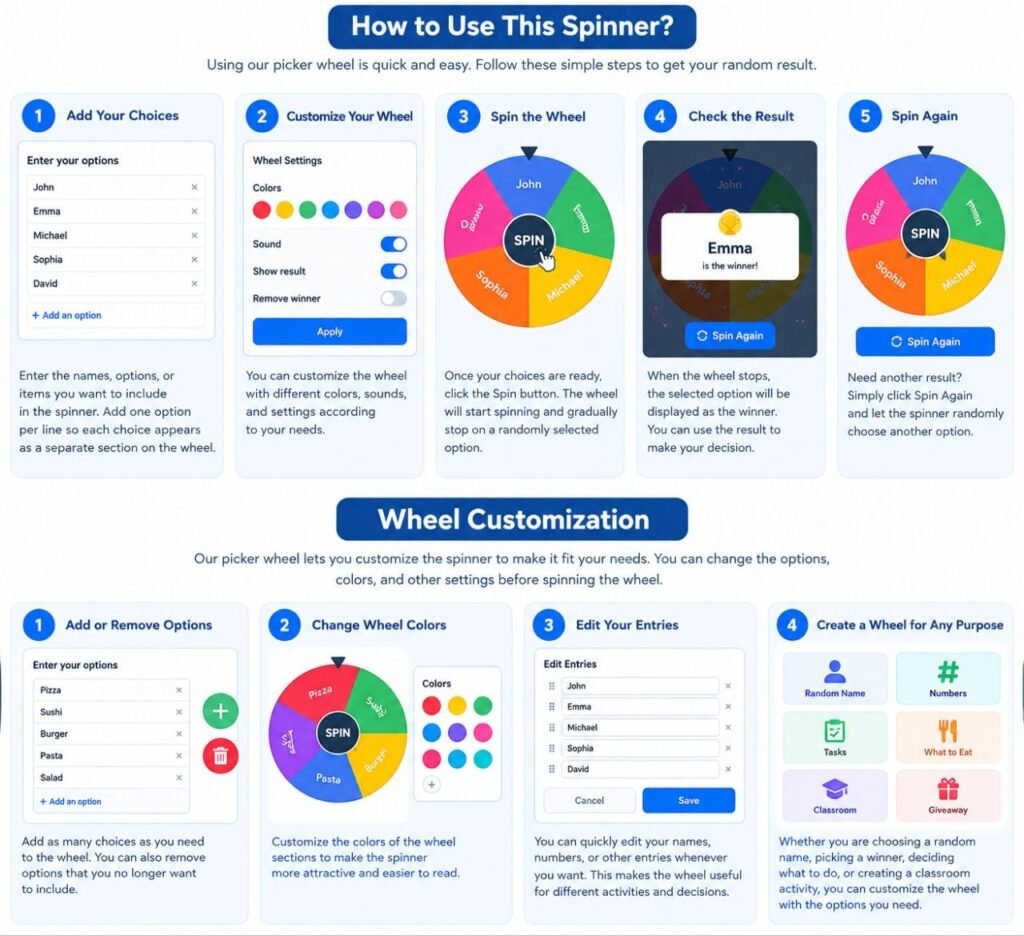
2. How to Use This Spinner?
Using our picker wheel spinner is quick and easy. You can use it to randomly choose a name, number, task, or any option you add to the wheel.
Step 1: Add Your Choices
Enter the names, options, or items you want to include in the spinner. Add one option per line so each choice appears as a separate section on the wheel.
Step 2: Customize Your Wheel
You can add or remove choices and customize the wheel according to your needs. Make sure all the options you want to randomly select are included before spinning.
Step 3: Spin the Wheel
Once your choices are ready, click the Spin button. The wheel will start spinning and gradually stop on one randomly selected option.
Step 4: Check the Result
When the wheel stops, the selected option will be displayed as the winner. You can use the result to make your decision or spin the wheel again.
Step 5: Spin Again
Need another result? Simply click Spin again and let the spinner randomly choose another option.
3. Wheel Customization?
Our picker wheel lets you customize the spinner to make it fit your needs. You can change the options, colors, and other settings before spinning the wheel.
Add or Remove Options
Add as many choices as you need to the wheel. You can also remove options that you no longer want to include.
Change Wheel Colors
Customize the colors of the wheel sections to make the spinner more attractive and easier to read.
Edit Your Entries
You can quickly edit your names, numbers, or other entries whenever you want. This makes the wheel useful for different activities and decisions.
Create a Wheel for Any Purpose
Whether you are choosing a random name, picking a winner, deciding what to do, or creating a classroom activity, you can customize the wheel with the options you need.
Once your wheel is ready, simply click Spin and let the wheel make a random choice for you.